Background
The company is a food processing enterprise established over 20 years ago. For many years, it has been dedicated to promoting the development of the baking, catering, and retail markets, providing comprehensive solutions to its customers.
Challenges
Initially, the company’s internal system requirements were met through custom development, with most demands coming from the sales team. As the business grew rapidly, the demand for development surged, making the traditional code-based development approach cumbersome, expensive, and unable to keep pace with the business’s growth.
At the beginning of this transformation project, the company had the following requirements for the chosen solution:
- Support both the enterprise AD account system and the tool’s own account system to meet the needs of the sales team and external suppliers.
- Enable mobile office capabilities.
- The company had already adopted SaaS software such as ERP and OA, so the solution needed strong integration capabilities to connect with existing systems.
Value
- Integrated multiple account systems and connected various internal software, enabling seamless interoperability.
- Significantly improved development efficiency. The initial implementation was completed in two weeks, a task that the original R&D team estimated would take two months.
- Enhanced cross-department collaboration efficiency: Automated processes freed employees from tedious tasks, allowing them to focus more on core business activities, reducing workload, and improving overall efficiency.
- Optimized management processes: Standardized and institutionalized internal workflows, helping to eliminate information silos and promote collaboration across departments, thereby improving overall operational efficiency.
- Eliminated issues of untimely and inaccurate information transmission, improving team collaboration efficiency.
- Facilitated resource preservation and utilization, helping to avoid resource and process losses due to employee turnover.
Core Application Scenarios
Integration of Multiple Account Systems
The company originally had an AD account system, but it was not available to all employees. Only office clerks had access, while sales staff did not. This meant that sales requests requiring system access had to be relayed to sales administrative staff for entry, resulting in extensive communication, repetitive work, and significantly reduced sales efficiency.
To enable all employees to log in to the system in the simplest way, this solution allowed sales staff without AD accounts to log in directly using their mobile phone numbers, while colleagues with AD accounts could log in via AD authentication. This enabled differentiated permission management.
After addressing internal system access, the solution also tackled collaboration between the business team and external suppliers. The solution provided an “external user” feature, directly integrating suppliers into the system with appropriately configured data permissions, controlling the scope of visible data, and facilitating business collaboration between the team and suppliers.

Mobile Office
The company’s sales team consists of over 500 people. Unlike other roles, sales staff spend most of their time working outside the office, making mobile office capabilities essential.
Additionally, since the company uses WeChat for daily communication, the solution also provided a convenient entry point for WeChat operations, enabling timely issue resolution and lowering the barrier to use.
In addition to offering a native app, the solution integrated WeChat notifications and a WeChat mini-program, significantly improving usability. The included CRM system provided access to customer basic information, group data, product delivery data, and customer complaint information. Sales staff could view and input relevant data directly via WeChat, making the process simple and intuitive.
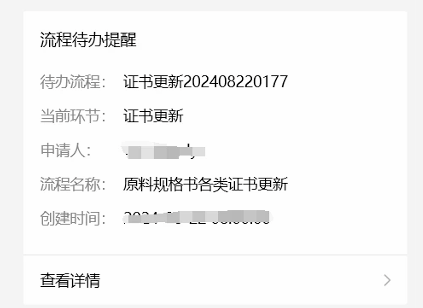
Cross-System Integration: Breaking Data Barriers
As mentioned in the challenges, the company had already adopted third-party SaaS software such as ERP and OA, but these systems could not share data. This solution connected these systems, serving as a crucial data bridge.
For example:
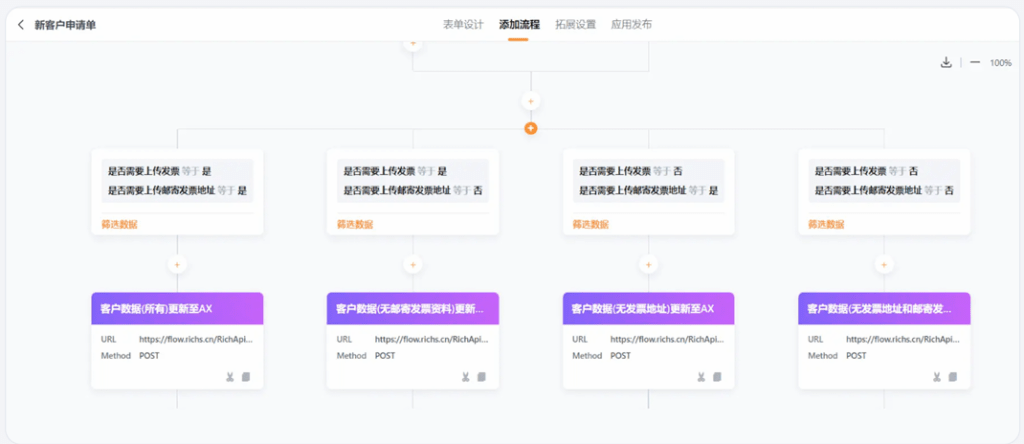
Previously, after collecting customer information, sales staff would send it to the finance team via Excel. The finance team then manually entered the customer information into the ERP system, which was time-consuming and labor-intensive. With this solution, once sales staff submitted relevant applications and obtained approval, the information was automatically synchronized with the ERP system.
 DIGITURBO